AI face swap: how it works, the consent rules, and when not to use it
A face swap replaces the face in a photo or video with another person’s likeness. The technique is mature and widely available, and that is exactly why the consent question comes before the quality question: the face being pasted belongs to someone. This guide explains how the pipeline works, the rules that decide whether a swap is acceptable, how to judge a tool before uploading anything, and why SnapToClip stays on the other side of the line — animating the face you photographed instead of substituting one. SnapToClip does not offer face swapping, voice cloning or lip-sync.
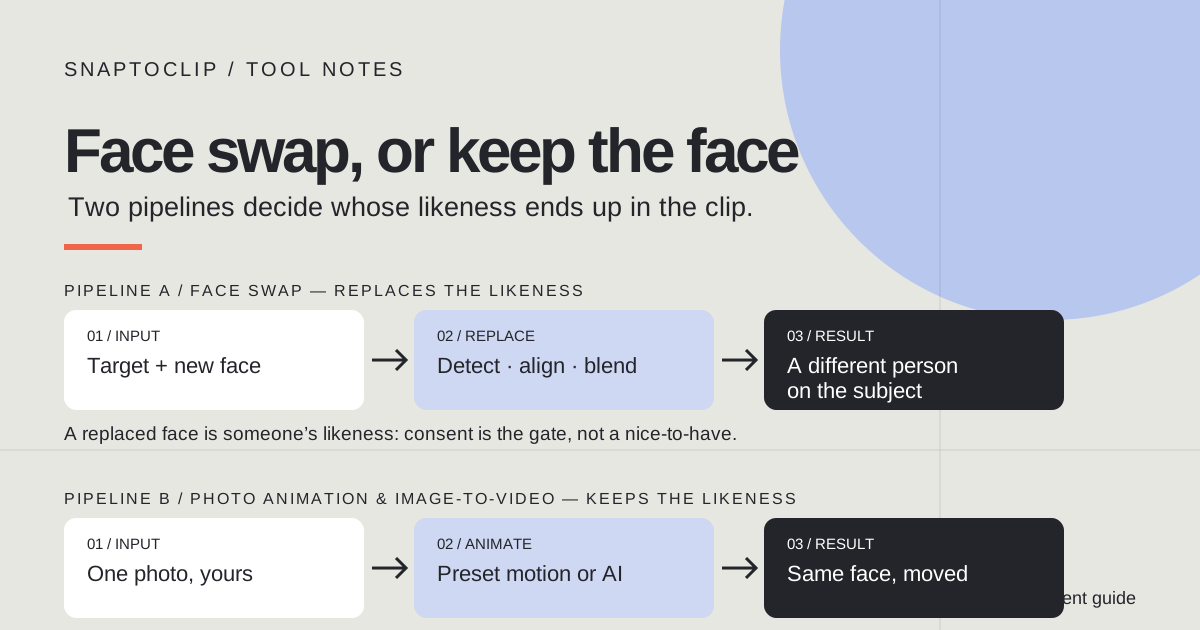
What a face swap actually does
A face swap takes two inputs: a target image or video that contains a face, and a source face that will replace it. The output keeps the target’s scene, lighting, pose and body, and substitutes the identity behind the face. In a photo this is a single operation; in a video it is repeated for every frame, which is why video face swaps need tracking as well as blending.
The keyword covers a family of tools rather than one product. Single-photo swaps put one face over another. Multi-face swaps handle several people in one image, which is the version most often sold behind a login. Video swaps re-render a clip frame by frame. GIF swaps do the same for short loops, with more artifacts because the source frames are small and heavily compressed.
What every version has in common is the object being moved: a likeness of a person. That is the part that makes the technique powerful and the part every rule on this page is about. The blending quality decides whether the result looks real; the consent question decides whether it should exist at all.
How face swap AI works, step by step
Two honest limits are worth knowing before comparing tools. First, quality depends on inputs: a sharp, evenly lit, front-facing source face beats a cropped party photo every time. Second, identity is never guaranteed — the output resembles the source face, and on hard frames it can drift toward a plausible stranger. Products that promise an exact likeness every time are overselling.
- Detect the faces. A detector finds every face in the target and the source, and a landmark model locates eyes, nose, mouth and jawline on each.
- Align the faces. The source face is rotated, scaled and positioned to match the target’s pose, so the replacement sits where the original was.
- Generate the replacement. A model blends the aligned source face into the target, matching skin tone, lighting and grain. Modern models do this diffusely rather than by pasting a cutout, which is why edges no longer betray the swap.
- Track across frames for video. The target face moves, turns and is partly covered, so each frame repeats the match. Frames where the face is blurred or hidden are where swaps most often fail.
- Refine and restore detail. A final pass restores sharpness, fixes teeth and eyes, and colour-matches. This step is also where tools quietly smooth the result into something the original person never quite looked like.
Face swap and photo animation are different tools
The two get confused because both start from a photo of a person and end with a video. The difference is whose face survives. A face swap exists to change the identity in the frame. Photo animation and image-to-video exist to add movement to a frame while keeping the person who was photographed.
| Face swap | Photo animation / image-to-video | |
|---|---|---|
| What you bring | A target photo or video plus a source face | One photo you own or are authorized to use |
| What changes | The identity behind the face | The motion, effects and framing — not the person |
| Whose likeness it needs | The source person’s consent, every time | The photographed person’s consent, once |
| Consent burden | Grows with every face you swap in | Stays with the photo you already have rights to |
| Good for | Fictional content where every face is licensed or yours | Greeting cards, product clips, portraits and pets kept as themselves |
| Typical refusal | Celebrity and public-figure faces, minors, non-consensual source images | Minors, unauthorized portraits, unsafe content |
The consent rules that decide whether a swap is okay
The person whose face is being used has to agree. That is the whole rule, and every complication below is a shadow of it. A face swap of yourself for fun clears it. A face swap of a friend who asked for it clears it. A face swap of a stranger, a colleague, an ex or a celebrity does not — and the fact that a tool will technically render it changes nothing about whether it should exist.
Public figures get a firmer no. Celebrity likenesses carry publicity and endorsement rights in many jurisdictions, every major platform’s policy bans synthetic media of real people without disclosed consent, and the payment providers behind consumer AI tools enforce those bans because a single scandal costs more than the whole category earns. The responsible tools block celebrity faces automatically rather than waiting for reports.
Disclosure travels with the file. A swap shared as obvious parody reads differently from one posted without context, and a growing number of jurisdictions now require synthetic media to be labelled as such. Laws on deepfakes and digital likenesses have tightened sharply through the mid-2020s and differ by country and state; the safe reading is that consent plus disclosure is the standard you will be judged against, and jurisdiction is not a loophole.
Two hard lines sit above all of this: no minors, and no sexualized likenesses of anyone. Every platform, every payment provider and every responsible tool treats these as absolute, and source images that sexualize a real person are not made acceptable by fictional intent.
How to judge a face swap tool before you upload
The checklist below takes five minutes and covers almost every way these tools go wrong. It works for face swap tools specifically, but most of it applies to any service that asks for a photo of a person.
- Look for a consent gate, not just a terms page. Serious tools ask who is in the source photo, block celebrity faces automatically and refuse minors before the upload finishes. A tool that swaps anything you give it is transferring its risk to you.
- Read the retention policy. Faces are biometric data. The trustworthy pattern is automatic deletion within a fixed window and a stated region where files are processed; an unstated policy on where your face is stored is a reason to close the tab.
- Check how it bills before you commit. One-time payments and clear per-task pricing are the honest shape for this category. Subscriptions that renew quietly are the most common complaint pattern in face swap reviews.
- Test the refuse path. Upload-free signals count too: a visible responsible-use policy, an age confirmation and a stated right to refuse subjects all show the operator thought about what the tool does.
- Keep your own footprint small. Use photos you have the right to use, prefer tools that say the word "delete", and do not upload third parties’ faces to a service you know nothing about — the upload itself is the harm in the bad scenarios.
When keeping the original face is the better job
Most people searching for a face swap do not actually need one. What they want is a photo that moves: a portrait that turns, a pet that leans in, a product that catches light. None of that requires replacing anybody. SnapToClip is built for exactly that job, on one photo, in five-second vertical clips.
The free path is photo animation: preset camera motion, effects, optional text and instrumental sound applied to the picture you uploaded, rendered in your browser without spending credits. It moves the frame, not the subject — the person in the output is the person in the photo. The paid path is AI image-to-video, where a model generates new frames and the subject can visibly move, with the model and credit cost shown before you confirm.
The identity trade-off is stated plainly rather than hidden: AI generation can change faces, hands and other details even when the prompt asks it not to, which is why the studio asks you to review the result before using it. What it will never do is substitute a different person on purpose. SnapToClip does not offer face swapping, voice cloning or lip-sync, duo templates require both people to already appear together in one photo, and every upload passes a safety review for authorized, adult, fully clothed subjects.
If the job genuinely requires putting one person’s likeness where another’s was — a licensed stunt, a consented joke between friends who both asked for it — use a dedicated tool that follows the checklist above, with everyone’s permission in writing. For everything else, the photo you already have is usually the better subject.
Find your scene.
Browse a template, then check creation availability in the homepage studio.
Explore the looks ↗