TIKTOK VIDEO TREND · PHOTO TO VIDEO
Last Dance AI video: a quiet backyard turn
The Last Dance format turns an outdoor portrait into a quiet, wistful moment in a backyard. The supplied clip shows the visual reference; the prompt below creates a simple new turn without copying a song or music video.
Open the prompt in the studio ↗Last Dance video examples
Two adults turn toward each other in a leafy backyard and share a brief, relaxed smile. These supplied archive clips are examples of the format, not videos generated by SnapToClip from the prompt below. Clip lengths and sound vary; select play to load a video.
Backyard Last Dance example
Last Dance trend archive · supplied video sample
Try a prompt inspired by this format →Artist, song and trend names are used to identify the visual format. Music and choreography rights remain with their respective owners; original commercial audio is not included in the creation prompt. Use audio you have permission to publish.
Make your own Last Dance AI video
Start with a clear photo of an adult, a pet or a product and adjust the prompt for one short action. SnapToClip’s generated clips are five seconds; the archive examples may be longer.
- 1Choose a look
- 2Frame your photo
- 3Review & create
- 4Check your video
Create a video from one photo
Two adults turn toward each other in a leafy backyard and share a brief, relaxed smile.
Use one clear photo with the entire subject visible.
1-4 photos · 5 seconds · vertical 9:16
Photo requirements and template guide →Reference video · Your result will use your photo.
Single reviewed model test · 5 seconds · silent. Results vary with your photo.
We are checking that photo review and video creation are available.
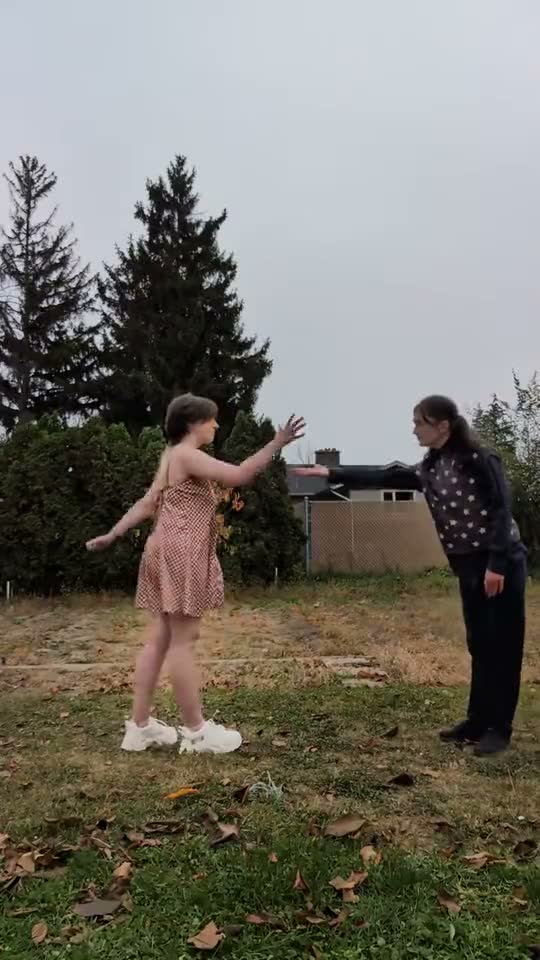 Last DancePeople · Two adults turn toward each other in a leafy backyard and share a brief, relaxed smile.Latest video example · View all looks
View or edit prompt Template
Use the template prompt as written, or adjust the movement, mood and camera angle.
Changes apply to your next AI video and require a new safety review. The example video does not reflect your edits. Your prompt is saved with your video so you can copy it later.
Adults only. Use a photo you have permission to use.
One clear adult portrait works best.No photo selected
Add up to 4 photos. Two or more make one shared scene with everyone in it.
Two adults turn toward each other in a leafy backyard and share a brief, relaxed smile.
Use photos of adults you have permission to use. Photos are checked before creation.
How to make this video style
- Use a clear adult portrait; for a couple scene, make sure both people are easy to distinguish.
- Keep the action to one turn and one small step for a natural five-second result.
- Review faces and body positions before downloading or sharing.
Copy the Last Dance AI video prompt
This is an original prompt starter for the scene, not a claim to reproduce a specific creator’s clip. Edit the setting and movement to fit your photo.
Create a five-second vertical, gentle backyard scene with one or two clearly adult people from the supplied photo or photos. Preserve each face, hairstyle, skin tone and clothing. Under a leafy garden backdrop on a calm overcast day, they slowly turn toward one another, take one small step and finish with a relaxed smile. Use a steady medium shot and natural color. Keep the movement grounded and personal; do not recreate a named music video, artist, lyrics or song. No text, logos or watermark.
Last Dance AI video questions
What is the Last Dance AI video trend?
It is a soft outdoor duet idea with a backyard setting and a slow turn toward another person. The archive contains one reference example.
Can I make a solo version?
Yes. Ask for a single person to turn toward the camera or a companion outside the frame. A second visible subject works best when both people are clear in the photo.
Does it include the Last Dance song?
No. This prompt creates original visuals only. Add a track only when you have the rights to use it on your intended platform.
What photos can I use?
Use a photo you have permission to use. SnapToClip accepts adults, pets and products; photos must pass the site’s safety checks. Do not upload children’s photos.
More TikTok AI video trends
Browse the AI video prompt library → · See model and credit details →