STYLE GUIDE · PHOTO TO VIDEO · ONE SHOT
A cinematic trailer shot from one photo
Reviewed 20 November 2026 · written against the live studio, not a spec sheet
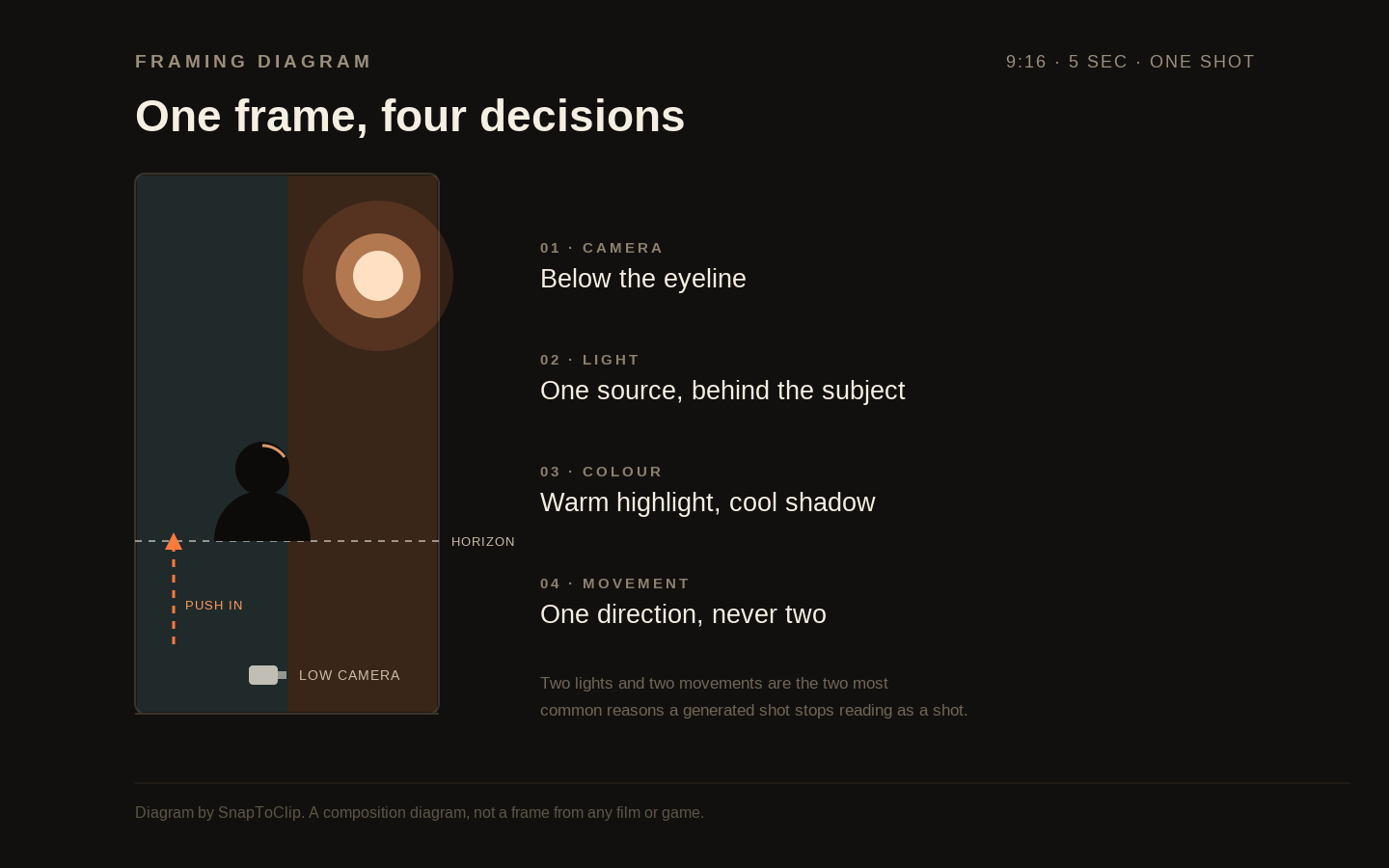
Trailer style is a set of camera and light decisions, not a plot. Low camera, one strong light, warm highlights against cool shadow, and a movement that goes in exactly one direction. Those four choices are what make five seconds of vertical video feel like a frame lifted out of something bigger. This page is about making them with a single photo — and about the part that a single photo cannot do, which is the part most pages leave out.
What makes a shot read as a trailer
Three things do most of the work, and all three are decisions you make before generating rather than corrections you make afterwards.
Camera height. Put the lens below the subject’s eyeline and drop the horizon into the bottom third. A low camera makes a person look like they are being looked up to, which is the entire emotional content of most trailer frames. A phone photo taken at chest height reads as a phone photo no matter how good the light is.
One light. A single strong source — a low sun, a sign, a doorway — gives the model one thing to be consistent about. Two competing sources give it two, and it resolves the conflict by flattening both, which is exactly the look you were trying to avoid.
A colour split. Warm highlights and cool shadow, or the reverse. This is the single most copyable part of the look, and the one the model gets right most often, because it is a global grade rather than a physical object it has to invent.
| Decision | Product ad | Lifestyle vlog | Trailer shot |
|---|---|---|---|
| Camera height | Eye level, product centred | Eye level, subject moving | Below the waist, horizon low in frame |
| Light | Soft box, even and bright | Available light, flat | One strong source, usually behind the subject |
| Colour | Neutral, accurate | Warm and natural | Warm highlights against cool shadow |
| Movement | Slow orbit or tilt | Handheld, reactive | One direction only: a push, a pull or a pass |
What one photo and five seconds can actually do
This is the table to read before spending credits. The left column is what people ask for; the right column is what the studio returns. The gap between them is where disappointment lives, and it is not a prompt problem — it is the format.
- A slow push in on one subject
- Yes — the most reliable request on this page
- A camera pass to one side
- Usually, if the background has something to pass
- Dust, heat haze, rain, drifting light
- Yes, as long as it stays behind the subject
- A cut to a second angle
- No — one clip is one shot
- A second scene with the same person
- No — generate a second clip and edit
- Speaking, lip sync or a script
- No — this studio does not offer talking portraits
- Readable titles or captions in the video
- No — AI text renders unreliably; add text in an editor, or use photo animation
- A named character or a specific film scene
- Not accepted — see the boundaries below
The pattern behind the refusals: a five-second clip is one continuous shot with no edit, so anything that requires a second camera position, a second scene or a spoken line is outside the format rather than outside the model.
Preparing the photo
The source photo decides more of the result than the prompt does. Six things worth doing before you upload:
- Shoot or crop vertical, or accept that a wide landscape frame will lose both sides to the 9:16 crop.
- Leave space in the direction the camera will move. A subject pressed against the frame edge has nowhere to be pushed into.
- Backlight is good, a black silhouette of a face is not. If the source face is in deep shadow the model has nothing to reconstruct from.
- Remove watermarks, stickers, subtitles and timestamps. They get regenerated as garbled text.
- One subject, or a group that is genuinely relating to each other. Two unrelated people in one frame usually become one blended person.
- Only use a photo you have the right to use. That means yourself, or someone who has agreed to it. Photos of strangers, celebrities and identifiable characters are declined in review.
Four prompt patterns that survive a photo
Every prompt below is short on purpose. A paragraph-long prompt usually contains three competing actions, and the model resolves the conflict by making everything move a little and nothing move well.
The push
“Slow dolly-in on the subject, low angle, sun low behind them, warm rim light, cool shadow in the foreground, shallow depth of field, no camera shake.”
One movement, one light, one colour relationship. Everything else in the sentence is a property of the shot, not a new action.
The pass
“Lateral tracking shot past the subject, foreground railing crossing frame, warm sign light on one side, cool ambient on the other, slight motion blur at the edges.”
A pass needs something in front of the lens to move against. Without a foreground element the model tends to slide the whole frame, which reads as a zoom.
The hold
“Static camera, subject turns their head toward the light, dust drifting through a warm shaft, background falls into shadow.”
The cheapest believable shot: the camera does not move, so the model spends its effort on the subject instead of the scene.
The reveal
“Camera tilts up from the ground to the subject, backlit, steam rising across the lower frame, deep orange sky, silhouette held.”
A tilt is a movement the model handles well because the subject stays in place. Put the subject in silhouette and the face is no longer a failure point.
Three rules cover all four: state one movement, describe the light instead of the mood, and name the lens or the camera position rather than stacking adjectives. “Cinematic” on its own tells the model nothing it can act on.
Five locations that carry a shot by themselves
The request that arrives most often is a particular beat from a particular game: this character, in this place, doing this thing. Choosing a different beat does not change the answer, and it is worth being precise about why. The obstacle was never the content of the scene. It is that a beat is three or more shots cut together, and that the person inside it belongs to somebody else. A place is one shot and belongs to nobody, which is why everything below is written as a location rather than as a moment.
Each of these is a light condition first and a setting second. That order matters: the grading is what makes the frame read as a trailer, and the setting is only what the grading is attached to.
Neon street, after rain
Wet asphalt doubling every sign above it, a figure walking toward the lens with red on one shoulder and cyan on the other.
“Low camera at hip height on a wet night street, neon signage out of focus behind the subject, warm red light on one side, cold cyan on the other, reflections doubled in the puddles, slow walk toward the lens, one direction only.”
Neon is light, not architecture, and wet ground is a mirror. Both are things the model reproduces well, because it is copying a colour and a reflection rather than inventing a building.
Highway, side window
Palm trunks cutting across warm street lights one after another, the sky still cold blue, the subject held in the near third.
“Side window framing, subject in the near third of frame, palm trunks passing across warm street lights in the background, cool blue sky above, lateral motion blur at the frame edges only.”
A pass is the most stable movement the model has, provided something crosses the lens. Give it trunks or a railing and the background travels; give it nothing and the whole frame slides like a zoom.
Swamp, backlit
Camera just above the water, reeds in silhouette, mist hanging between them, the subject reduced to an outline.
“Camera just above the waterline, subject in silhouette against a low sun, mist drifting between reeds, flare through the grass, no face detail, static frame.”
Silhouette deletes the single biggest failure point on this page. If the face is a shape rather than a likeness, there is nothing for the model to get wrong.
Storefront, two in the morning
Cold white light spilling out of a glass door onto wet pavement, sodium yellow on the other half, the subject standing on the seam.
“Static frame outside a glass storefront at night, cold white interior light on one half of the pavement, warm sodium street lamp on the other, subject standing where the two meet, no camera movement.”
A warm-cool split is a global grade, not an object. It is the cheapest way to make a phone photo look graded, and the one correction the model almost always gets right.
Rooftop, tilt up
From bare concrete up to a figure at the edge, the skyline collapsing into bokeh behind them, loose fabric moving.
“Tilt up from a rooftop floor to a figure standing at the edge, skyline reduced to bokeh behind them, backlit, wind moving loose fabric, subject does not move.”
A tilt works because the subject stays put while the camera does the travelling. Ask for a tilt and a walk at the same time and the model will do neither cleanly.
All five take a photo of yourself, or of someone who has agreed to it, and none of them need a character, a title or a named street. If a setup only reads when a specific person is standing in a specific place, it is not a setup — it is the thing this page declines, and no amount of prompt rewriting will move it into the doable column.
Where the line is
Camera position, colour, light direction and pacing are style, and style is not owned by anyone. A specific character, a named location, a logo, a vehicle design and the scene built around them are owned, and putting a real person’s face inside one is a second problem on top of the first.
So this site does not offer a template that reproduces a character or a scene from a game or a film, and it will not accept a request to build one. What it offers is the shot: the framing, the grade and the movement, applied to a photo you have the right to use. If an idea only works when a particular character is standing in a particular place, that idea is not something one photo in this studio can deliver, and saying so is more useful than selling a credit and disappointing you.
The same rule covers real people. Every person in an uploaded photo must be clearly adult, fully clothed and have agreed to the use. Photos are reviewed before generation and output is held if review is uncertain or unavailable. Read the terms of use and the privacy policy for the full list.
The settings behind the price
Nothing about the look changes the format. Whatever model runs the clip, the output is the same size, which is why this page can be specific about cost.
- Output
- Five seconds, 9:16 vertical, 720p
- Photos per clip
- One to four; one is the normal case
- Standard model
- 1 credit silent, 2 credits with sound — chosen for you
- Seedance 2.5 upgrade
- 4 credits, selected by you and priced before you confirm
- Free alternative
- Browser photo animation: motion and text over your existing image, no new scene
- Titles and captions
- Not in AI output; photo animation has text controls, or add them in an editor
Credit packs are one-time purchases, not a subscription. See the current packs and model list for the exact amount at checkout.
Cinematic trailer questions
Can I make a full game trailer from one photo?
No. Every clip in this studio is five seconds, 9:16 and one shot. A trailer is several shots cut together, so the realistic output here is one shot that would sit inside a trailer: a single push in, a single light, one subject. If the idea needs a cut, generate two clips from the same photo and edit them elsewhere.
Can I put a specific game character or scene in the video?
Not on this site. Characters, named locations and the specific scenes built around them belong to their owners, and taking a photo of a real person and placing it inside one is both a copyright problem and a consent problem. The style is available; the character is not. What is available is the location without the character: five worked setups are further down this page, each written as a light condition and a camera move rather than as a moment from a story. Photos are reviewed before generation and requests to reproduce identifiable characters or scenes are declined.
Is it free?
There is no free AI generation tier here. The free option is browser photo animation, which adds camera movement, particles and optional text to the image you already have and cannot create a new scene. A five-second AI clip costs 1 credit silent or 2 with sound on a standard model, and 4 on the Seedance 2.5 upgrade you select yourself.
How many photos should I upload?
One is the normal case, and one to four are accepted. More than one is only useful when the extra frames show the same subject from a similar angle in similar light. Two photos with different lighting give the model two conflicting references and it averages them, which is how faces drift.
Why does the face or the hands change in the result?
The model reconstructs the person rather than cutting them out of the frame, so likeness, hands, jewellery and clothing details can shift. A sharp, evenly lit photo with the face large in frame reduces the drift but does not remove it. Check every face in the finished clip before sharing it, and keep the take where the person is still recognisable.
Can I use the clip commercially?
The clip is yours to use subject to the terms of the site and to the rights in whatever is depicted in your photo. A generated background does not grant rights to a logo, a uniform, a vehicle design or a recognisable location that happens to appear. Read the terms before putting a clip in an ad.
In one paragraph
Pick a photo with one subject and one light, put the camera low, decide which single direction the shot moves, and write that down as one sentence. Five seconds later you have a shot that could sit in a trailer. You do not have a trailer, a story, or anyone else’s character — and the reason this page says so plainly is that those are the three things people most often expect and least often get. Start with a standard model at 1 credit, and move to Seedance 2.5 only when the framing already works.